 SpinWheel
Random Team Generator
Paste the roster. Split into teams. Mark captains if you need leads. Drag one person if a pairing should change, then copy for the chat.
- 100% Random
- Free & Easy
- No Login Required
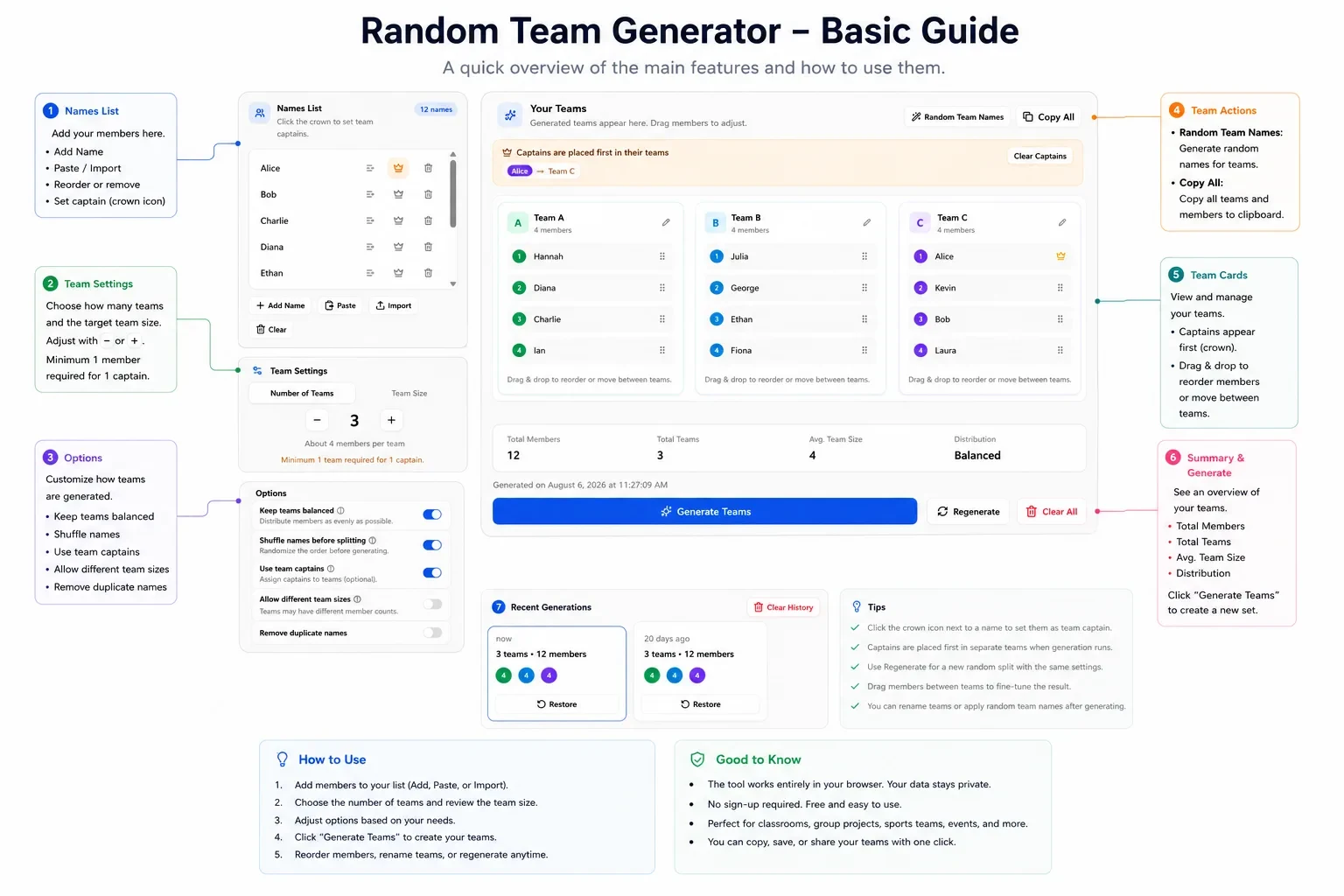
Names List
Click the crown to set team captains.
Team Settings
Options
Your Teams
Generated teams appear here. Drag members to adjust.
Add names and click Generate Teams to create your groups.
Tips
- Click the crown icon next to a name to set them as team captain.
- Captains are placed first in separate teams when generation runs.
- Use Regenerate for a new random split with the same settings.
- Drag members between teams to fine-tune the result.
- You can rename teams or apply random team names after generating.
Your privacy is important: All data is processed in your browser. Nothing is uploaded to our servers.
Paste the roster, set Number of Teams or Team Size, then hit Generate Teams. People land by chance, so friends and the strongest players do not end up together just because they sat next to each other. Free. No account. Names stay on this device.
Captains
Need a lead on each squad? Crown a few names and turn on Use team captains. Each captain goes onto a different team first. The rest of the list fills in around them.
Need a manual fix after generate? Drag one person to another team.
Team count or team size
Already know you need four groups? Use Number of Teams.
Want groups of five? Switch to Team Size and let the headcount decide how many teams you get.
Keep teams balanced keeps sizes within about one person when the math allows. For a messy game where uneven is fine, turn on Allow different team sizes.
How random is this?
Some pages sort a column by a random number. Looks shuffled. Bias creeps in.
Here the list gets a Fisher-Yates shuffle with crypto.getRandomValues() in the browser (MDN). Hit Regenerate and you get a new mix. Good enough for class, gym, workshops. Not a regulated lottery.
Chance is not the same as skill balance. If you need two strong players on every side on purpose, generate once and drag, or build the lists yourself.
Quick steps
- Paste or import names (one per line;
.txt/.csv). - Set teams or team size. Crown captains if you want leads.
- Generate. Drag anything that looks wrong. Copy All.
- Need a different mix? Regenerate, or restore an older split from history on this device (up to 50).
Labeled map of the controls:
Team generator vs name picker
| Random Team Generator | Random Name Picker | |
|---|---|---|
| Job | Split a list into teams | Pick one name |
| Best when | You already know the team count or team size | You need one person, not groups |
| On this site | This page | List picker, no wheel required |
Need a new order, not groups? Shuffle list. Want a custom spin wheel for the room? More small tools: random tools hub.
Be the first to review
Share a quick rating if this page helped you.
Share your experience and help others
Review policyFrequently Asked Questions
More Random Tools
View all random tools →
Create Your Own Custom Wheel
Add your own options, colors, images and more.