 SpinWheel
Shuffle List
Paste your list. Shuffle. Copy the new order. If you hate that mix, restore an older one from history on this device.
- Fair Fisher-Yates mix
- Free · no login
- Stays on your device
Enter Your List
Enter one item per line.
Shuffled Result
Your randomized list appears here.
Shuffle your list to see the new order here.
Tips
- Enter one item per line.
- Use "Paste" to paste from Excel or any document.
- Enable "Remove duplicate items" to shuffle unique values.
- Click on any history card to restore that result.
- You can download the shuffled list as a .txt file.
Your privacy is important: All data is processed in your browser. Nothing is uploaded to our servers.
Paste the list, one item per line, and hit Shuffle. You get the same names in a new order. Read it top to bottom. Whoever was first on the sheet is not first by default.
This page does not pick one winner. For that, use the name picker. For groups, use the team generator.
Why bother shuffling?
First on the spreadsheet often goes first in the room. That is hard to defend when someone calls you on it. One shuffle, and you are done arguing about the order.
Who this is for
Teachers lining up who presents. Anyone running standup who is sick of the same opener. Playlist people who want a new run. Game night when turn order turns into a fight.
Ticket numbers instead of names? Try the random number generator. Want people to watch the pick? Use a spin wheel.
Is it fair?
Some sites sort by a random column. Looks random. Math is not great.
Here: Fisher-Yates, with crypto.getRandomValues() from the browser (MDN). Each full ordering of your list is equally likely. Hit shuffle again and you get a new mix - yesterday does not lean on today.
Fine for class, meetings, casual draws. Not a legal lottery system. Check your own rules for big giveaways.
Quick steps
- One item per line (paste from Excel is fine).
- Turn on "remove duplicates" if the sheet doubled people.
- Shuffle. Copy, or download a
.txt. - Went too far? Restore from recent mixes on this device (up to 50).
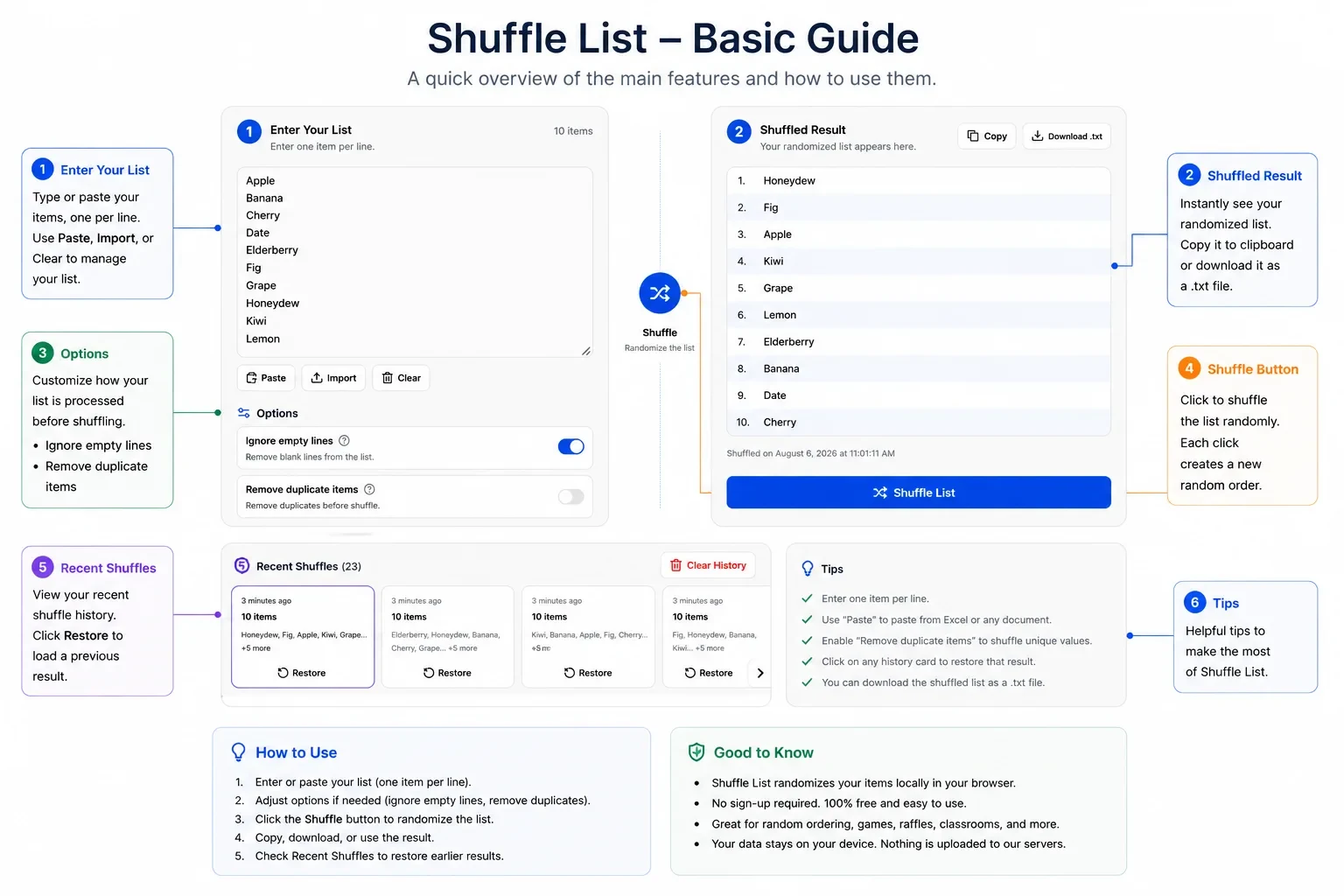
The guide below labels the main controls on this page.
Shuffle vs pick vs split
- Shuffle list - same people, new order.
- Name picker - one winner.
- Team generator - split into groups.
- Yes or no generator - when you do not need a list.
Other quick tools (coin, dice, numbers): random tools hub.
Be the first to review
Share a quick rating if this page helped you.
Share your experience and help others
Review policyFrequently Asked Questions
More Random Tools
View all random tools →
Create Your Own Custom Wheel
Add your own options, colors, images and more.