 SpinWheel
Yes or No Generator
Going in circles? Tap Ask Again for Yes, No, Maybe, or answers you typed yourself. Free in your browser.
- 100% Random
- Free & Easy
- No Login Required
- 5.0 · 3 reviews
Options
Answer mode and animation.
The answer is...
Answer
-
Tip: Press Enter or Space to ask quickly.
Tap Ask Again. This page picks Yes or No, fifty-fifty. Free in the browser. No account.
Takeout or cook. Send the text or leave it in drafts. You have already argued both sides. Live with what lands.
This is not a sports coin toss. For Heads or Tails on a 3D coin, use the coin flip. Here the labels say Yes, No, Maybe, or words you wrote yourself.
What this page actually does
It picks one answer from a small pool. Default is Yes or No, fifty-fifty. Switch to Yes / No / Maybe, True / False, or Custom Answers if two options feel wrong.
That is the whole job. Not a personality test. Not life advice. A fair pick with words on it.
A week I wasted on one Yes or No
I once liked a girl and spent a full week deciding whether to tell her - bad sleep, the same what-ifs on loop. Looking back, that was not thinking. It was stalling. The math never got cleaner.
If I had this Yes or No tool then, I would have typed the question, tapped once, and followed it - not because an app understands love, but because a fair coin beats another empty week of fake calculation. Ask once. Or admit you will ignore the result and do what you wanted anyway. That is useful too.
Who this is for (and who should leave)
Fine when the choice is too small for a meeting and too annoying to leave open. Class True / False warm-ups. A stream "should we try this?" prompt. Two friends who refuse to pick a movie. A text you keep rewriting.
Need names from a roster? Use the random name picker. Need a number in a range? Use the number generator. Need a long custom list people can watch spin? Build a spin wheel.
Four answer modes
Under Answer Mode, pick the pool that matches the moment. Every option in that pool has equal odds on that ask.
- Yes or No - classic binary, 50/50.
- Yes / No / Maybe - three equal paths when "not now" is a real answer (~33% each).
- True / False - quiz labels for class or study games.
- Custom Answers - one option per line, at least two. Party prompts, chores, short lists.
Is it fair if I ask again?
Each answer uses crypto.getRandomValues() in your browser - the same Web Crypto style randomness browsers use for secure sessions (MDN). Three Yes in a row does not make No "due." The next tap is a fresh draw.
If you keep hitting Ask Again until you like the result, you already knew what you wanted. The tool just made that obvious.
Pick an animation - Answer Picker, Flip, Fade, or Typewriter - and toggle Sound if you want flair. The answer is chosen before the animation plays. Motion and sound are for show only.
Sample batch: 100 to 5000 asks (Yes or No mode)
Same browser crypto path as each live Ask Again - one real batch, not hand-picked demo counts. Your next 100 asks will not match this table. That is fine.
| 100 | 500 | 1000 | 5000 | |
|---|---|---|---|---|
| Yes | 49 (49%) | 246 (49%) | 510 (51%) | 2497 (50%) |
| No | 51 (51%) | 254 (51%) | 490 (49%) | 2503 (50%) |
Percents use whole-number rounding: Math.round((count / total) * 100). Example: 246 / 500 = 49.2% rounds to 49%; 254 / 500 = 50.8% rounds to 51%. At 100 asks, a 49/51 split is ordinary. Past 1000, the split usually hugs 50/50 without landing on a perfect half every time.
Sample batch: 100 to 5000 asks (Yes / No / Maybe mode)
Separate test batch in Yes / No / Maybe mode - three equal paths (~33% each per ask). Same crypto path as live asks. Another independent run, not the Yes or No table above reused.
| 100 | 500 | 1000 | 5000 | |
|---|---|---|---|---|
| Yes | 35 (35%) | 170 (34%) | 326 (33%) | 1669 (33%) |
| No | 34 (34%) | 169 (34%) | 329 (33%) | 1651 (33%) |
| Maybe | 31 (31%) | 161 (32%) | 345 (35%) | 1680 (34%) |
Same whole-number rounding: Math.round((count / total) * 100). Example: 326 / 1000 = 32.6% rounds to 33%; 345 / 1000 = 34.5% rounds to 35%. Rounded percents can add to 99 or 101 - that is the display math, not a loaded pool. In a short run the three labels will not sit on a perfect third. Over thousands of asks they usually sit near 33% each.
What you see on screen
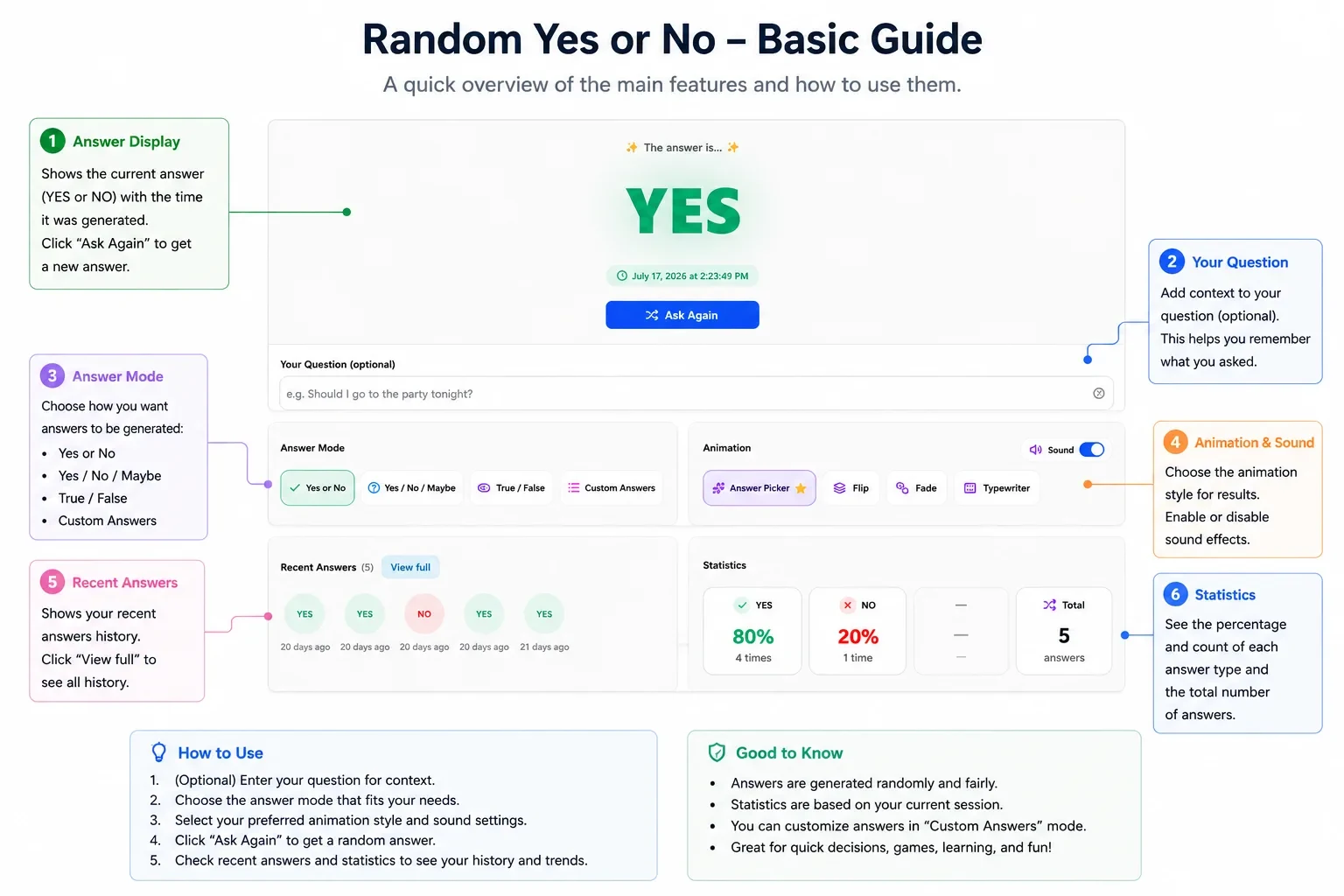
The answer card
The card shows a dash until the first ask, then the chosen label. Ask runs the first draw. Ask Again runs the next one. Copy copies the latest answer. Enter or Space asks from the keyboard. Fullscreen sits on the header and on the results panel.
Recent history
Recent History lists past asks on this device (up to 200). Scroll sideways for older cards. Download .txt and Clear sit on that row.
Yes/No vs coin vs wheel
- Yes or no (here) - word labels, four modes, custom lines, history on this device.
- Coin flip - Heads / Tails, sports-style, 3D coins.
- Dice roller - numbered faces and modifiers.
- Spin wheel - many options, colors, share link, audience spin.
When not to use this
Fine for "should we order pizza" or "do I send the text tonight." Bad for legal calls, medical choices, money, lotteries, or anything you would regret blaming on a website. A random Yes does not replace judgment. It only breaks a loop when the loop itself is the problem.
More tools
Coin, dice, names, lists, and the rest live on the random tools hub. When Yes / No / Maybe is too small for the choice, build a custom spin wheel instead.
Ratings and reviews
5.0
Based on 3 reviews
Share your experience and help others
Review policyReviews
Frequently Asked Questions
More Random Tools
View all random tools →
Create Your Own Custom Wheel
Add your own options, colors, images and more.