 SpinWheel
Online Dice Roller - Free 3D Polyhedral Dice
Free 3D dice roller in your browser - mix D4-D20 dice, add a +/- modifier, and share your table in one link.
- 100% Random
- Free & Easy
- No Login Required
- 165 views
- 4.0 · 1 review
An online dice roller lets you roll fair polyhedral dice in your browser - tap Roll and watch 3D D4-D20 dice land on the table. Use it when you lost the dice bag, play on a video call, or need rolls everyone can see on a projector or stream.
SpinWheelPlus mixes up to 25 dice on one table, adds RPG modifiers like 2d6+3, and shares your setup in one link - free, with no app or account required.
Each face is chosen with crypto.getRandomValues() in your browser, so odds stay honest: one-in-six on a D6, one-in-twenty on a D20, with every roll independent of the last. When you set a +/- modifier, the summary shows dice total, bonus, and final result so your group can follow the math on camera or at the table.
Build a table in seconds - add D4 through D20, pick colors, then copy a share link for your RPG night or lesson. Every tap rolls the whole table. Roll history and session stats stay on your device for quick fairness checks between games.
What Is an Online Dice Roller?
A dice roller simulates physical polyhedral dice with a visible, unbiased digital roll. Instead of shaking a cup, you add the dice types you need (D4 through D20), roll once, and read the total - with optional +/- modifiers for tabletop bonuses.
Dice are among the oldest gaming tools we know. Archaeologists have found four- and six-sided dice over 4,000 years old in Mesopotamia and Egypt, and Roman soldiers famously diced for stakes. Tabletop role-playing games added the full polyhedral set in the 1970s - and this page covers all of them in one free tool.
Who Is This Dice Roller For?
- Board game players - replace lost dice in Monopoly, Yahtzee, or travel games
- RPG groups - D&D-style attack rolls, damage, and skill checks with modifiers
- Teachers - probability demos, sums, averages, and the 2d6 bell curve on a board
- Party and stream hosts - turn order, challenges, and visible fair picks
- Coaches and facilitators - rep counts, stations, or quick decision rolls
Common Use Cases
Board games and family nights
Missing a D6 from the box? Open this page and roll instantly. Mix several dice when a game asks for multiple rolls at once.
Classroom probability
Roll two D6 repeatedly and chart the totals: 7 shows up most often while 2 and 12 are rare. Session stats on this page summarize averages and distributions from recent rolls on your device.
Quick decisions
Number your options 1-6 (or add more dice) and let the roll pick. For yes/no prompts, try the yes or no generator instead.
Key Benefits
- Free in your browser - no download, subscription, or login to roll
- Fair randomness - each face uses browser-grade secure randomness (see How it works)
- Up to 25 dice - D4, D6, D8, D10, D12, and D20 on one table
- RPG modifiers - +/- totals from -99 to +99, saved with your setup
- Share and export - copy a link, export JSON, or download roll history as .txt
- Mobile-friendly - works on phones, tablets, and classroom displays
Why Use SpinWheelPlus?
Physical dice get lost, loaded, or hard to read on camera. A digital table keeps odds visible and consistent.
Basic search widgets often stop at one D6. Here you mix polyhedral types, modifiers, colors, and shareable setups in one place - alongside other free tools on SpinWheelPlus.
Dedicated apps can be fine, but many require installs or accounts. This roller runs instantly in Chrome, Edge, Safari, and other modern browsers.
Need names or custom labels instead of numbers? Browse classroom wheels, open a name wheel, or build your own spin wheel.
How It Works
Each roll picks a face with crypto.getRandomValues() - the Web Crypto API primitive browsers use for session tokens - not a predictable seeded script. Every face keeps its exact odds over time: 1/6 on a D6, 1/20 on a D20, and so on. Each roll is independent of the last.
Roll two D6 and totals form a bell curve - 7 is most common while 2 and 12 are rare. That is the same math teachers use when explaining probability with real dice, now visible to the whole class.
Features on This Page
Everything below the hero sits on one page - no tabs to hunt through. Here is what each part does.
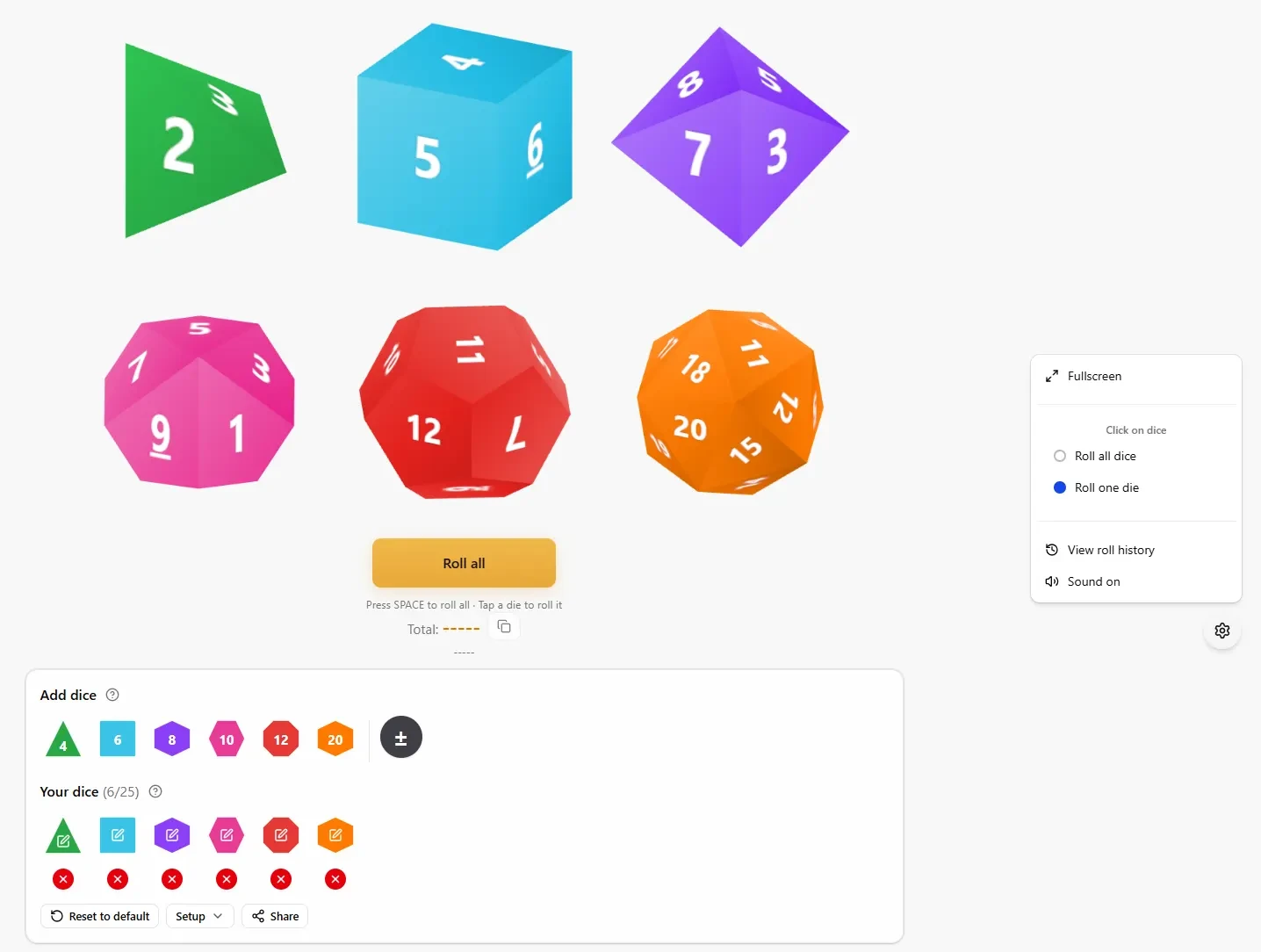
Add dice
Tap D4, D6, D8, D10, D12, or D20 to put another die on the table (up to 25). Next to the dice types, the ± tile opens Roll modifier - add a bonus or penalty from -99 to +99 that applies to your total (for example +3 on 2d6+3). The modifier does not change how individual dice roll.
Your dice
Lists every die on the table with a count like (3/25). Tap a die icon to edit it (type, face color, mark color, D6 Numbers, Dots, or Words). Tap the red × to remove a die - you always keep at least one on the table.
Reset to default returns to a single D6. Setup opens Export setup... and Import setup... for JSON backups. Share copies a link so friends or your RPG group open the same dice, colors, and modifier.
The dice table
3D dice sit on the canvas. Tap Roll with one or two dice, or Roll all when you have three or more. While dice tumble, the button shows Rolling.... Tapping the table rolls every die. Press Space to roll from the keyboard.
After a roll, copy the result from the summary line. With a modifier set, you will see separate Dice, modifier, and Final totals.
Roll results and session stats
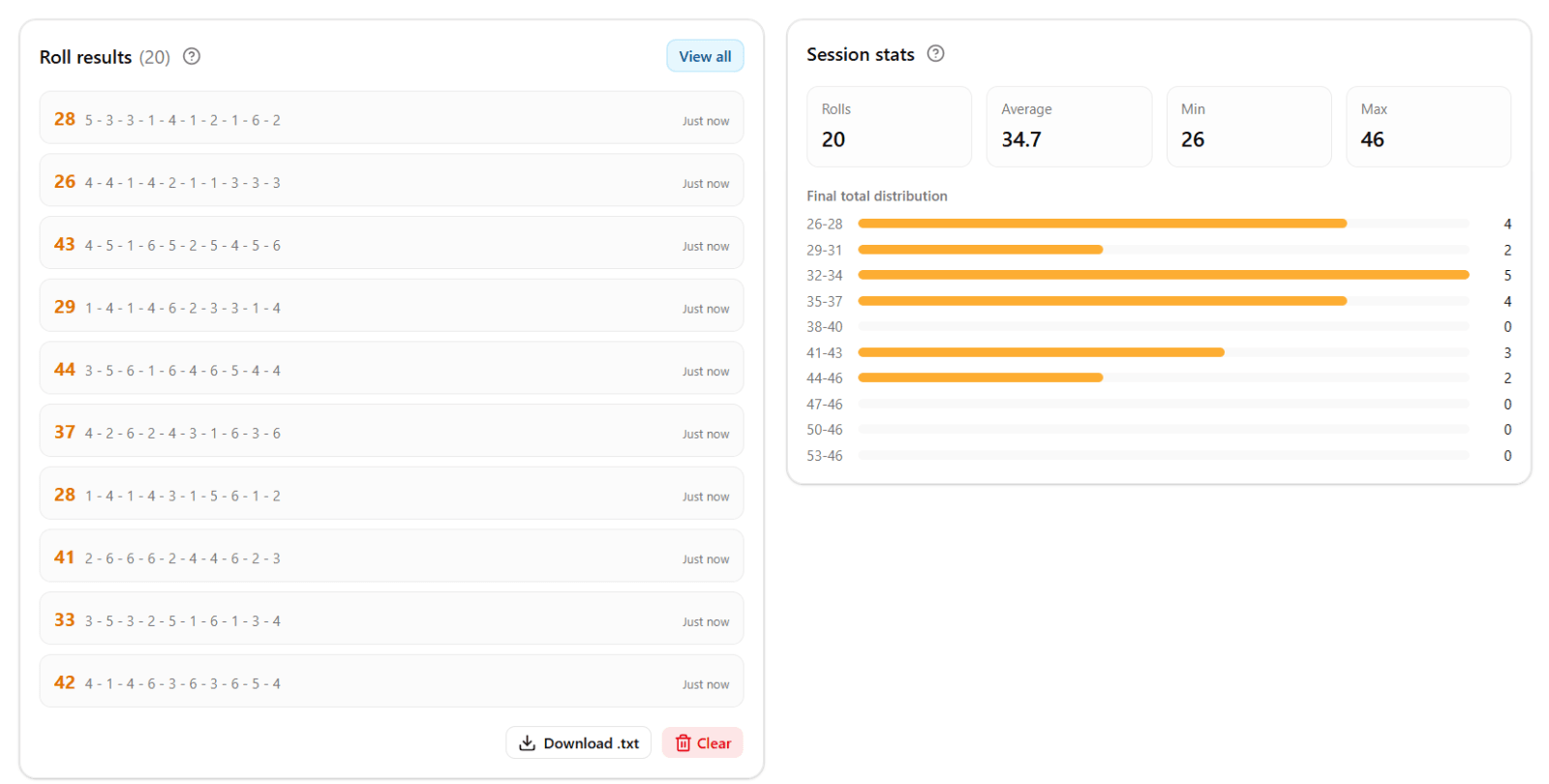
Roll results lists rolls saved on this device (up to 200). The list scrolls when it is taller than the panel. Download .txt exports the history file. Clear wipes the list when you start a new session.
Session stats summarizes rolls from that history: count, average, min, max, and - for single-die sessions - a face distribution chart so you can talk about fairness in class.
Dice table options (gear menu)
- Fullscreen / Exit fullscreen - for projectors and streams
- View roll history - same list as Roll results
- Sound on / Sound off - roll audio in quiet rooms
How to Customize Your Dice Table
Change colors and D6 style
Open Edit on any die. Pick a new die type, set Face and mark colors, and switch a D6 between Numbers, Dots, and Words. Word faces show up to three short lines. Dots often read better on a projector.
Save your setup for next time
Share for a URL, Setup → Export setup... for a JSON file, or Import setup... to restore a table you built earlier. The modifier is included.
Dice Types and Which Games Use Them
Not sure which die to add? Match the physical dice your game box lists on the rule sheet.
D6 - the classic six-sided die
The die most board games use. Reach for D6 when you play Monopoly, Yahtzee, Ludo, Trouble, Risk, Clue, Catan (with the red die), and countless family or party games that say "roll a die" without a shape.
D4 - four-sided (pyramid) die
Almost always an RPG die, not a mass-market board game piece. Common in Dungeons & Dragons, Pathfinder, and similar tabletop RPGs for small weapons, daggers, and low-level spell damage. If your game never mentions a "d4," you probably need D6 instead.
D8 - eight-sided die
Another tabletop RPG staple - typical in D&D and fantasy RPGs for one-handed weapons and certain spell effects. Uncommon in standard board games sold at big-box stores.
D10 - ten-sided die
Used heavily in D&D (some weapons and spells), World of Darkness (Vampire, Werewolf), Call of Cthulhu, and other RPGs that lean on 1-10 or percentile rules. This page has D10, not a separate D100 - many tables roll two D10s for percentile results, or use one D10 when the rules ask for 1-10.
D12 - twelve-sided die
Mostly fantasy RPGs again - think big two-handed weapons in D&D. Rare in board games unless the box explicitly includes a d12.
D20 - twenty-sided die
The main die for D&D, Pathfinder, and most modern tabletop RPGs - attack rolls, skill checks, and saving throws. Also shows up in some RPG-style board games (for example Dragon Strike or other D&D-branded titles). Pair it with the +/- modifier for character bonuses.
Mixing dice on one table
RPG players often roll 1d20 + 2d6 in one action - add each type under Add dice, roll once, and read the breakdown. Board nights might only need two or three D6 for games that ask for multiple dice at once.
Checking Fairness Over Many Rolls
You do not need a separate lab test to build trust. Roll repeatedly in class or with your group, then open Session stats - averages, min/max, and single-die face distributions (for one-die sessions) summarize what already landed on this device.
For a flat list of names or ticket numbers, use the random number generator. For two outcomes only, try the coin flip.
More Random Tools
Explore the full random tools hub - coin flip, yes/no, name picker, team generator, shuffle list, and more - or create a labeled spin wheel when dice are not the right fit.
Ratings and reviews
4.0
Based on 1 review
Share your experience and help others
Review policyReviews
Frequently Asked Questions
More Random Tools
View all random tools →
Create Your Own Custom Wheel
Add your own options, colors, images and more.