 SpinWheel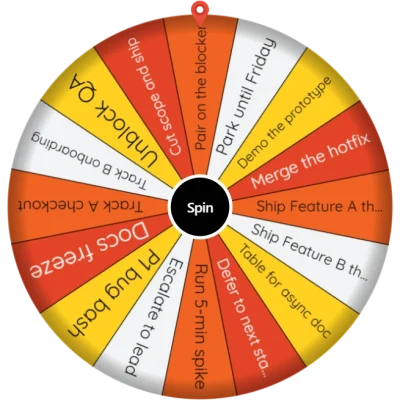
Meeting Topic Wheel
Spin this meeting topic wheel to pick which agenda topic goes first. Edit the list, trim the parking lot, and use Remove Winner so a topic does not repeat.
Be the first to review
Share a quick rating if this page helped you.
Share your experience and help others
Review policyUse this meeting topic wheel to choose which agenda topic to discuss first. Before the team sits down, open it on a shared screen beside the agenda whiteboard, tap Spin, and land which backlog heading gets airtime first.
How this meeting topic wheel runs agenda spin
You are picking the next discussion heading, not a person. Trim the parking lot. Rewrite the slices to match today's board. Turn on Remove Winner if this meeting covers more than one topic, then spin, discuss, and spin the rest. This meeting topic picker does not replace planning. Keep required-order blocks off the wheel.
If you need a different office job, start from More Business & Work wheels. This wheel picks which topic to discuss first. Keep approvals and fixed-order items off the spin.
Which labels belong on a meeting topic wheel
Put discussion headings on the slices: Budget review, Hiring plan, Client escalation. Drop closed items, deferred parking-lot items, and any name. Do not load Approve vendor A vs vendor B. Do not load a wild-idea round that only belongs in a workshop. Start with 8-12 topics for today's meeting, and remove anything that does not belong on the agenda.
Each spin uses crypto.getRandomValues in your browser. With equal weights, every agenda topic still on the wheel has the same chance.
How to run agenda spin
Parking-lot edit. Drop closed or deferred items. Keep required-order blocks (approvals that must go first) off the wheel.
Rewrite every slice as a discussion heading. Not a person. Not Option 1. If this standing pack is not the board, paste your agenda into a spin wheel online.
Turn on Remove Winner if this meeting covers more than one topic, so a landed heading cannot return until the others had a turn.
Click Spin. Wait until it stops.
Discuss the landed item. Honor the heading that won this block.
Next topic. The winner is already off. Spin the rest of the board.
When this wheel helps
Weekly team sync, Remove Winner
Cover more than one heading in the same meeting. After a wrap, that slice leaves so the same topic cannot eat the next block.
Cross-functional backlog, discussion items only
Engineering, support, and sales can share one list. Every slice stays a heading (Support backlog, Launch comms, Client escalation). Do not add attendee names.
Parking-lot trim before the first spin
Delete closed items and deferred follow-ups first. Start with 8-12 topics for today's meeting, and remove anything that does not belong on the agenda.
Tips
Start with 8-12 topics for today's meeting. The default list is longer so you can delete what you do not need. Long sentences are hard to read in the room.
Topics only. If a name is on a slice, take it off.
Parking-lot trim first. Closed and deferred items do not belong on this spin.
Turn on Remove Winner for a multi-topic meeting, not so you can reroll a heading you dislike.
Keep required-order approvals off the wheel. Those stay a fixed block on the board.
Full screen for the room. Share the standing-meeting link with the co-host who runs next week.
You may also like
Browse popular wheelsPopular Random Tools
Quick randomizers for picks, teams, giveaways, and more