SpinWheel
SpinWheelPlus vs Wheel of Names: Which Fits Your Event?
Compare SpinWheelPlus vs Wheel of Names. Explore wheel customization, fast name picking, Google Sheets import, and data storage to find the right tool.
By SpinWheelPlus Team
9 min read
SpinWheelPlus and Wheel of Names both pick a random entry in the browser, for free, with no install. They are not the same kind of tool. Wheel of Names is a customizable wheel: you can link a Google Sheet, save to the cloud or to a file on the device, and share a link. SpinWheelPlus pairs a wheel editor with a separate Name Picker for when the room does not need to watch a spin. Use the one that matches the list you already have and whether people should see the result happen.
What each tool is built for
Wheel of Names is built around the wheel. You type entries, or import a column from a Google Sheet, then spin. The sheet can stay linked, so new form responses show up on the wheel. Their randomness FAQ also says the wheel can display up to 1,000 names. If the text box has more than that, the wheel still gives every name in the box the same chance, and only 1,000 appear on screen at once. Customization is part of the product: weights, a center logo, a background, a color theme, a large sound library, a share link, and an interface in many languages. Saves can live in the cloud or in a local file that stays on the device.
SpinWheelPlus splits the job. The wheel is for a public moment: weighted slices, images, custom sounds (including a sound on a slice), share links, and embed. The Name Picker is a separate page for a list: paste names or import a .txt file, skip accidental duplicates, remove a winner, copy the result, and keep a history of up to 100 picks on that device. No account is required for that picker. A browser add-on for Chrome, Edge, and Firefox can keep a local wheel in the side panel beside another tab. That add-on is not the full website editor. Share links, embed, and account saves stay on the site.
This post compares the two products. For the choice between a wheel and a list on SpinWheelPlus alone, see when to use a wheel or a name picker.
Choose by the job
Start from the list and the room. The table is a fit guide, not a scoreboard.
| Your situation | Closer fit | Why |
|---|---|---|
| Names already live in Google Sheets or a Google Form | Wheel of Names | Import links a sheet column to the wheel and can pull in new rows. See the spreadsheet section for what happens if you remove a winner. |
| The room should watch a short, readable spin | Either wheel | Both can brand the wheel and share a link. SpinWheelPlus adds embed and per-slice sounds. Wheel of Names adds a large sound library, more than one wheel on a page, and many UI languages. |
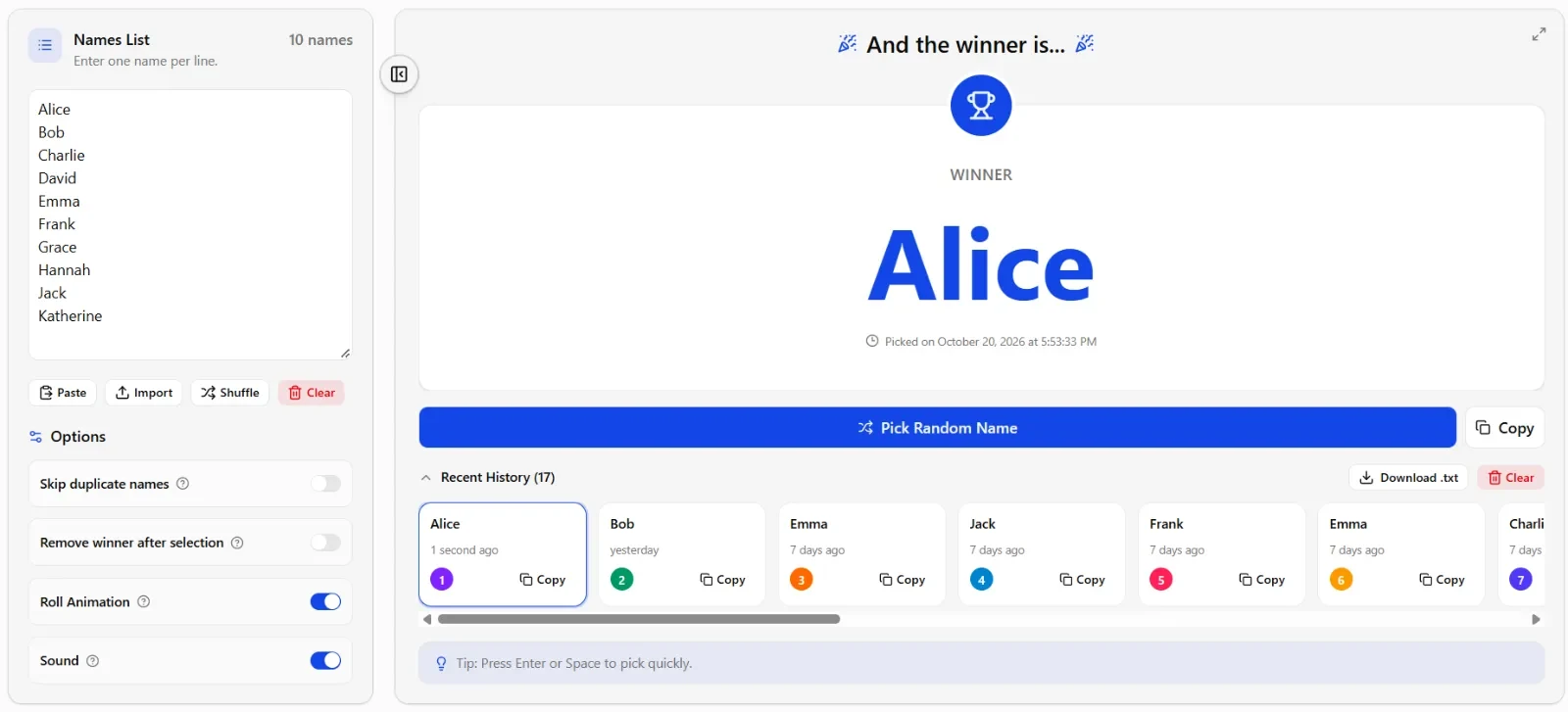
| You need one name quickly, then paste it somewhere else | SpinWheelPlus Name Picker | Paste or import a .txt file, pick, and copy. Optional roll animation. The winner is chosen before any animation starts. |
| Same person must not win twice | Both, unless a live sheet must keep updating | Both can remove a winner. On a linked Wheel of Names sheet, that removal stops later sheet updates. The Name Picker can remove a winner and still download history as .txt. |
| The list should stay on this device only | Wheel of Names for a wheel file; Name Picker for a temporary list | Wheel of Names can save a local wheel file. Name Picker lists and pick history stay on the device, but they are not a portable wheel file. A SpinWheelPlus wheel that follows you to another device uses an account. |
| You want the wheel beside Meet or a doc | SpinWheelPlus add-on | Chrome, Edge, and Firefox. The panel wheel is stored on the device. It does not replace the site editor. |
| The interface needs a language other than English | Wheel of Names | Their interface is localized into many languages. SpinWheelPlus is English. |
If the list already lives in a spreadsheet
This is the clearest Wheel of Names win. Their how-to walks through a Google Form, the response spreadsheet, then More, then Import Google Spreadsheet. You pick the spreadsheet, tab, and column. New submissions can appear on the wheel without a fresh paste.
Read the limit before the event. If you remove a winner, that same how-to says the spreadsheet link breaks and later edits to the sheet no longer flow in. For a raffle that must stay tied to the form, spin first and record winners outside the wheel, or accept that removal ends the live import.
SpinWheelPlus does not import Google Sheets. For the Name Picker, paste the column or import a .txt file with one name per line. That is enough when the roster is already text and you do not need the wheel to update itself. It is the wrong setup when the list is still growing from a form during the event.
If people should watch
Use a wheel when the selection is part of the event: a classroom turn, a prize on a projector, a meeting that should see the same result. Both tools are built for that.
Keep the wheel readable. Use a list short enough to read from the back of the room. That is practical advice, not a product cap. Wheel of Names documents a display limit of 1,000 names and says labels get too small beyond that. SpinWheelPlus also lets a wheel hold a long entry list (the editor shows a 1,000-item cap). A long wheel can still be random and still be hard to read. If the audience needs to see each name, shorten the list before you put it on screen.
Say the rule before the first spin. Equal slices mean equal chances. A heavier slice is supposed to win more often. Wheel of Names puts weights in an advanced mode and draws the slice larger. SpinWheelPlus does the same kind of thing: weight changes the chance on purpose. A branded theme does not change that math.
Both document crypto.getRandomValues() rather than Math.random(). Wheel of Names describes using it in the wheel physics on their randomness FAQ and publishes a spin checker. SpinWheelPlus uses it for the wheel and the Name Picker, and publishes a separate randomness check. Same family of browser randomness. It does not make a weighted wheel "equal," and it does not turn either tool into a licensed lottery. For a large prize, check the rules where you are.
If you only need the name
Use the Name Picker when animation would slow the room down: a long roster, several picks in a row, or a result that must land in a chat or gradebook.
- Bring the list in. Paste, or import a .txt file with one name per line.
- Decide what a duplicate means. Turn on "Skip duplicate names" when a repeated line is an accident. Leave duplicates in when a repeated line is an extra chance. Letter case does not matter for the skip.
- Decide whether winners stay eligible. "Remove winner after selection" is for first, second, and third without replacement. Leave it off when the same person may be picked again.
- Pick and copy. "Copy" puts the name on the clipboard. Recent history on this device holds up to 100 picks, and you can download that history as .txt.
You can still finish in public. Pick a short final group with the Name Picker, then build a wheel for the last spin. Wheel of Names can do the public half of that. It does not offer this separate no-spin picker.
Accounts and where the data sits
Neither tool requires an account for a one-time spin in the browser.
Wheel of Names keeps the wheel you last edited on that device automatically. A named Save can go to the cloud (open it on another device) or to a local file (the entries stay on the machine). They describe nightly backups for cloud wheels. A local file is yours to copy or delete.
SpinWheelPlus Name Picker data stays on the device. Do not expect that list to appear on a second computer. A saved wheel that should open on another device needs an account. Guest use of the wheel in the browser is fine for a session. The add-on wheel is also device storage, not the account library.
Pick the storage before the event. A shared classroom computer, a phone you might lose, and a form that keeps receiving names are three different problems.